Replace Linktree, Typeform and Calendly With One Flow
See when one guided bio-link flow can replace separate link, form and booking tools, and where keeping a specialist tool is the better choice.

If you're a coach, consultant, or freelancer, there's a good chance you're currently paying for three tools that do one job between them: Linktree shows your links, Typeform qualifies your leads, and Calendly lets them book a call. The problem is that these three tools don't talk to each other — and every handoff between them is a place where prospects drop off.
Who this guide is for
This is for coaches, freelancers, and consultants who currently use Linktree + Typeform + Calendly (or similar combinations) and want to reduce costs and increase conversions from their bio link.

This guide shows exactly how to consolidate all three into a single smart link — and why doing so typically increases conversions while cutting your monthly tool spend by 70–80%.
The three-tool problem coaches and freelancers have
The typical setup for a professional selling services online looks like this: a Linktree link in the bio pointing to a Typeform intake form, which then redirects to a Calendly booking page. Each step made sense when you added it. But together, they create a fragmented experience that leaks prospects at every seam.
The visitor lands on your Linktree. They have to choose between five or six links and figure out which one is relevant to them. They click the Typeform link. They fill out the form. Then they get an email with a Calendly link. Then they pick a time slot. By this point, you've asked a motivated prospect to complete four separate steps across three different products — each with its own brand, its own loading time, and its own chance to lose them.
Research consistently shows that conversion rates drop by 20–30% with each additional step in a funnel. A three-step funnel built on disconnected tools isn't just expensive — it's a leak that's silently costing you clients every week.
What Linktree, Typeform, and Calendly each do
Understanding what each tool does individually makes it clear why replacing them with a single, integrated tool makes sense.
What Linktree does
Linktree gives you a single URL (linktr.ee/yourname) that hosts a list of links. A visitor clicks your bio link and sees buttons pointing to your website, social profiles, and services. It's simple, it works, and it's been around since 2016. The limitation is fundamental: it's a static menu. Every visitor sees the same page regardless of who they are or what they need.
What Typeform does
Typeform lets you build conversational forms and surveys. For professional service providers, it's commonly used as an intake or discovery questionnaire: "What's your main challenge?", "What's your budget?", "What's your timeline?" The results help you qualify prospects before investing time in a call. The problem is that Typeform is a separate product with its own URL, its own branding, and no native integration with your bio link or your booking tool.
What Calendly does
Calendly handles scheduling. Once a prospect has expressed interest and filled out your intake form, they need to book a time on your calendar. Calendly syncs with Google Calendar and Outlook, handles time zones, and sends reminders. It's genuinely excellent at what it does. But it sits at the end of a chain — it has no knowledge of what the prospect answered in Typeform, and it has no connection to what they clicked on Linktree.
The real cost: money, friction, and lost leads
Let's put numbers on this.
A typical professional setup pays: Linktree Pro at $9/mo, Typeform Basic at $25/mo (for more than 10 responses), and Calendly Standard at $10/mo. That's $44/mo — $528/year — for three tools that do one job and don't communicate with each other.
Pricing accurate as of the publication date. Please verify current offerings on each platform's website.
Beyond the financial cost, there's a conversion cost. Every time a user crosses a tool boundary — leaving Linktree to open Typeform, leaving Typeform to open Calendly — you're asking them to restart their mental context. The experience feels disjointed. The branding changes. The URL changes. It signals "this person has cobbled together a stack" rather than "this person runs a professional business."
There's also a data cost. Because your three tools don't share data, you have no unified view of your funnel. You don't know what percentage of people who saw your Linktree filled out the form. You don't know what percentage of form completers booked a call. You have three separate dashboards with no connective tissue.
How one smart link replaces all three
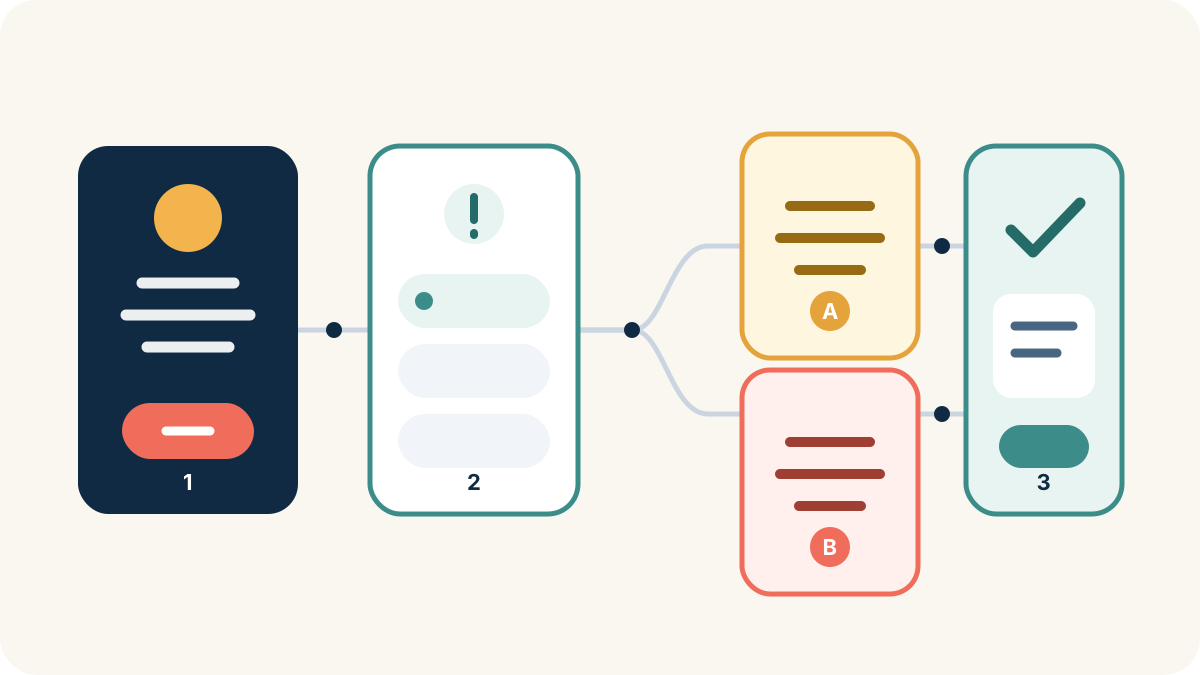
A smart bio link tool like SellB.io works differently from a static link list. Instead of sending everyone to the same page of buttons, it lets you build an interactive flow: a multi-step experience where visitors answer questions and see different screens based on their answers — all within a single URL.
Here's how a coach would replace all three tools:
Step 1 replaces Linktree. The first screen of your bio link shows your name, your offer, and a clear CTA. Instead of a list of six links, there's one focused entry point. Visitors who click "I want to work with you" move forward. Everyone else can still navigate to your social profiles or resources.
Steps 2–3 replace Typeform. The next screens ask the qualification questions you currently have in your Typeform: budget, timeline, specific challenge, service fit. Because these screens are inside the same flow, there's no URL change, no branding switch, no dropout moment.
The final step replaces Calendly. After qualifying, visitors who are a good fit see a booking screen directly embedded in the flow. Their calendar slot is connected to everything they just answered — no separate email with a link, no context switch.
The entire journey — from "I clicked the bio link" to "I've booked a discovery call" — happens in one place, under one URL, with one brand.
Step-by-step: building your replacement flow
Here's exactly how to build this in SellB.io.
Step 1: Set up your bio profile screen
Your first screen is your digital front door. Add your photo, your name, your positioning statement, and a primary CTA button ("Work with me", "Book a free call", "See how I can help"). Keep it clean — one dominant action.
Step 2: Add your qualification screens
Using the flow builder, add 2–3 screens with single-question formats. Good qualification questions for coaches and consultants: "What's your biggest challenge right now?", "What's your investment range?", "How soon are you looking to start?" Use conditional logic to branch: if someone selects "I'm not sure about budget", they go to a value-education screen before the booking prompt.
Go deeper on lead qualification
- How to qualify leads from your bio link — Use conditional flows to pre-qualify visitors before they reach your calendar
Step 3: Capture the lead before booking
Add a lead capture screen before the booking step. Ask for name and email. This is the step that most three-tool stacks miss: if the visitor doesn't complete the Calendly booking, you have nothing. With a native lead capture screen, you have their email regardless of whether they book — and you can follow up.
Step 4: Close with a booking or CTA
The final screen for qualified prospects shows a direct booking link or an embedded calendar. For prospects who aren't quite ready, route them to a different screen: a free resource, a case study, or a "join the waitlist" option.
Step 5: Review your analytics
SellB.io's analytics show you exactly where in the flow people drop off. You'll see impressions, completion rate per screen, and overall conversion rate from first visit to booked call. This is the unified funnel view that your three separate tools don't currently provide.
Want to build this funnel from scratch?
Set aside a focused session for the first version, then test every branch, form, and destination on mobile before sending traffic.
Side-by-side comparison: three tools vs. one link
| Linktree + Typeform + Calendly | SellB.io | |
|---|---|---|
| Monthly cost | $44–$64/mo | €12–€99/mo |
| Tools to manage | 3 separate products | 1 |
| URL changes in funnel | Yes (3 different domains) | No (one URL throughout) |
| Conditional logic | Typeform only (mid-funnel) | Throughout the entire flow |
| Lead capture before booking | No | Yes |
| Unified analytics | No | Yes |
| Custom domain | No (Linktree) | Yes (Pro plan) |
| Branding throughout | Mixed (3 brands) | Fully yours |
| Setup time | Several hours | ~20 minutes |
The financial case is straightforward. Replacing three tools with one saves between $25–$45/mo depending on your current plans, with more features and a better user experience.
The conversion case is stronger. A unified flow with no tool handoffs, native lead capture, and conditional logic that routes visitors to the right offer typically outperforms a three-tool stack by a significant margin — because it removes the moments where prospects drop off.
Explore SellBio plans, choose the page structure that fits your goal, and test the complete journey on mobile before publishing.
Looking at more Linktree alternatives?
- 5 best Linktree alternatives in 2026 — Free and paid options compared on features, pricing, and best use case
Frequently asked questions
Can SellB.io really replace Calendly for booking?
SellB.io doesn't have a native calendar scheduler (it doesn't sync with Google Calendar the way Calendly does). What it does is route qualified prospects to your Calendly, Acuity, or any other booking tool — but as the last step of a qualified, lead-captured funnel rather than the first stop. Most coaches find this is actually better: they only send their Calendly link to prospects who've already indicated they're a good fit.
What happens to prospects who don't finish the flow?
If you've included a lead capture screen (step 3 above), you have their email even if they don't complete the booking step. SellB.io stores these as leads in your dashboard. Without native lead capture — which none of the three tools provides end-to-end — those partial completions are invisible to you.
Is it difficult to migrate from Linktree?
Migration is straightforward. Your Linktree URL can be redirected to your SellB.io bio link. Any link you had in Linktree can be recreated as a screen or button in SellB.io in a few minutes. The main work is setting up your qualification flow, which takes 20–30 minutes the first time.
What if I need more complex logic than SellB.io supports?
SellB.io's conditional logic covers the use cases that the vast majority of coaches and freelancers need: branching based on single-choice answers, routing to different screens or external URLs based on responses, and gating content behind lead capture. If you have a genuinely complex multi-path survey with scoring and weighted logic, you may still need a dedicated form tool — but that's a rare edge case.
How does pricing compare over a full year?
A Linktree Pro + Typeform Basic + Calendly Standard stack costs approximately $528/year across three tools. SellB.io replaces all three with one integrated subscription — from €12/mo — so you consolidate three bills into a single flow, with better conversion potential.
Pricing accurate as of the publication date. Please verify current offerings on each platform's website.
Ready to turn followers into customers?
Sell products, capture leads, take bookings, and guide every visitor from one link.